A shopping mall app has a different job from a typical retail or e-commerce app. People do not necessarily open it every day, browse it for extended periods or build a regular habit around it. They usually open it because they are visiting a particular mall and need something: a store location, a promotion, a restaurant, parking information, an event or directions to a destination.
That changes how the app should be designed.
A visitor might be walking through a crowded mall, holding shopping bags, accompanying children or trying to find a store before it closes. They may not know the mall's layout or even be familiar with the app. If the information they need is difficult to find, slow to load or confusing to navigate, they may simply close it and ask someone for directions.
A successful shopping mall app must therefore do more than display a directory and promotional banners. It should make the physical mall easier to explore, help retailers connect with potential customers and give mall operators a stronger digital channel for managing the visitor experience.
This is also an area where digital product strategy and practical implementation matter. My experience as a Digital Project Consultant includes working on the Meraas mobile app project and Majid Al Futtaim app projects, including Mall of the Emirates and apps for all 16 City Centres across the GCC. The Mall of the Emirates app user base grew by 22%.
In this article, we'll look at what goes into developing a shopping mall app that works for all three audiences: shoppers, retailers and mall operators.
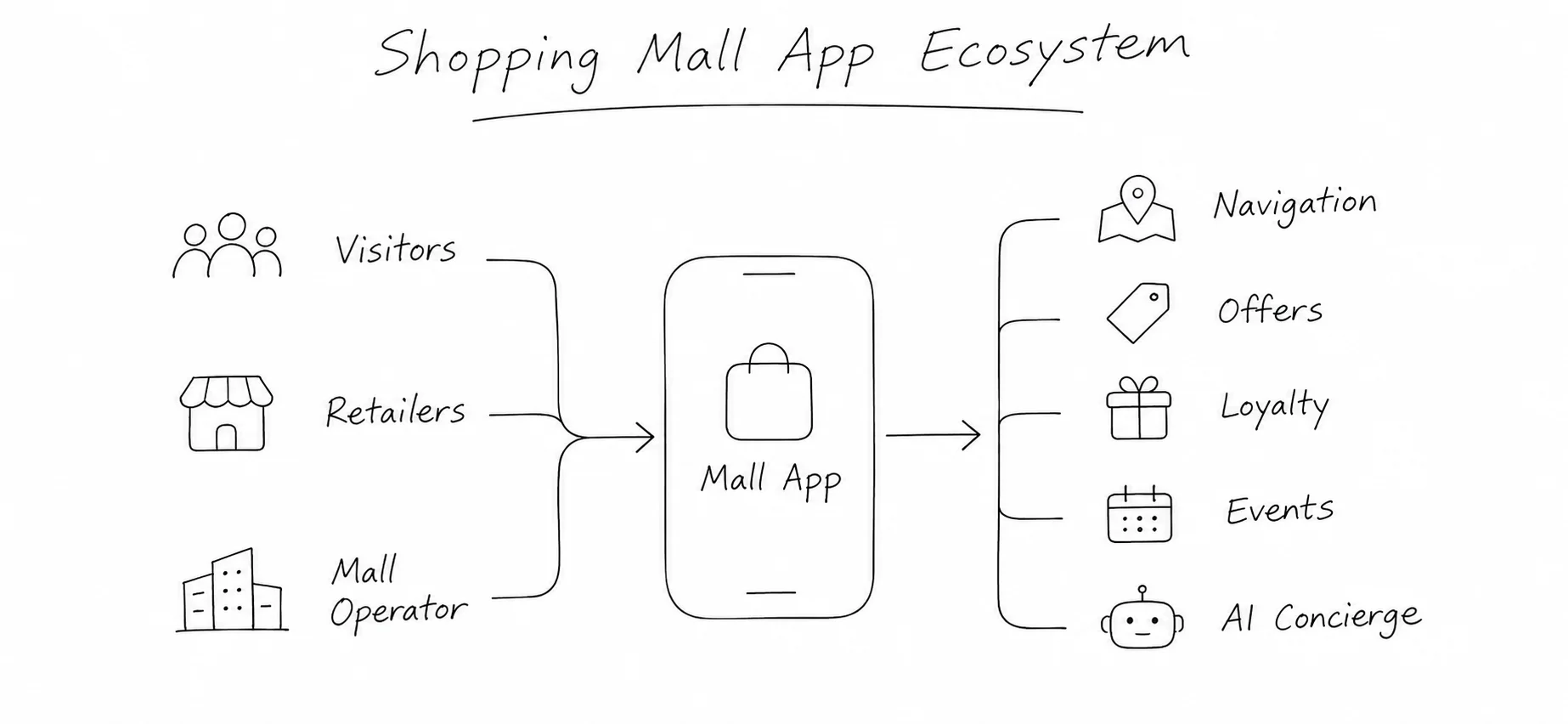
1. Understanding How People Actually Use Shopping Mall Apps
Before deciding which features to build, it is important to understand the environment in which the app will be used.
A shopping mall app is often a context-dependent product. Unlike a banking, messaging or social media app, it may not be something visitors use every day. Many visitors may only open it before or during a mall visit, and their usage may be brief and task-oriented.
Consider a few common situations:
- A visitor wants to find a particular fashion brand.
- A family wants to locate a restaurant or children's play area.
- A shopper has parked their car but cannot remember the parking zone.
- Someone wants to know whether a store has a current promotion.
- A visitor is attending an event and needs to find the venue.
- A tourist wants to understand the mall's layout before exploring it.
These are immediate needs. The visitor is not necessarily interested in learning how the app works. They want to complete a task and get back to their visit.
Research published in Artium in February 2026 examined four shopping centre apps in Istanbul through app usability testing and field studies inside the malls. The researchers found that many visitors did not recognise the apps, with poor promotion and usability problems contributing to the issue. The study also found that visitors responded positively after testing the apps, suggesting that useful digital capabilities can improve the mall experience. Source
This highlights two separate challenges: visitors need to know that the app exists, and once they open it, they need to understand how to use it.
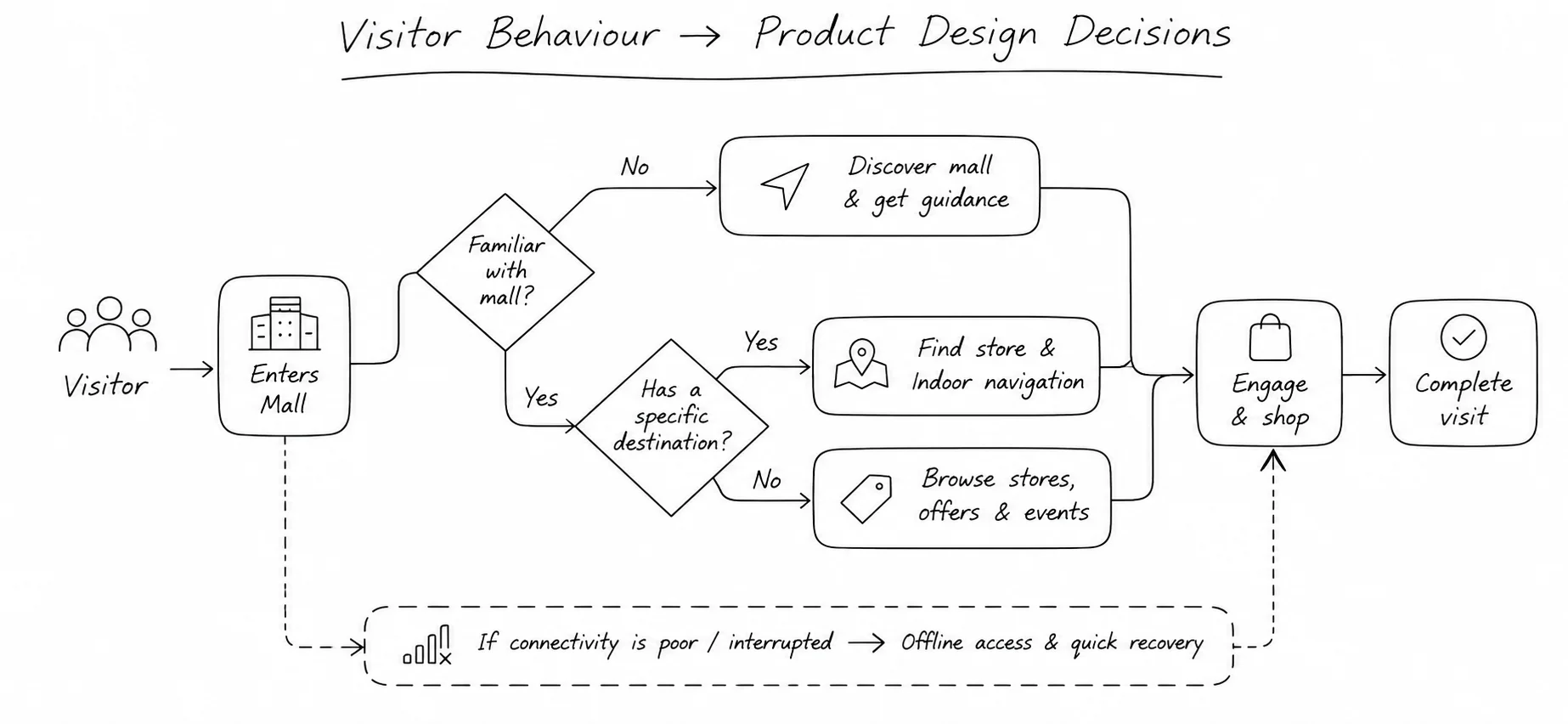
Design for first-time and occasional users
A mall app should not assume that visitors remember its navigation structure or have used it before.
The most important tasks should be immediately visible. Store search, the mall map, parking and visitor services should not be hidden behind several layers of navigation.
The interface should also use familiar labels. A visitor looking for a restaurant should not have to guess whether the information is under "Discover", "Lifestyle", "Experiences" or another marketing-oriented category.
Design around short, task-focused sessions
The app should help visitors complete common tasks with as few unnecessary steps as possible.
For example, finding a store should ideally involve:
- Opening the app.
- Searching for the store.
- Viewing its location and floor.
- Starting navigation if required.
The visitor should not need to browse multiple promotional screens or create an account just to find a store's location.
The design principle is simple: make the visitor's immediate task easier, rather than asking the visitor to learn the app.
2. Designing for Visitors Who Are Moving, Not Sitting
One of the biggest differences between a mall app and many other mobile applications is the physical environment in which it is used.
Visitors are often moving while using their phones. They may be walking through corridors, approaching escalators, navigating crowds or looking for signs. Their attention is divided between the screen and their surroundings.
This has direct implications for interface design.
Research on mobile map cognition highlights how using a map in a dynamic physical environment increases cognitive demands. Users must interpret the map while also understanding the environment around them. The research discusses reducing this cognitive load through better map design and by supporting the user's attention between the screen and the physical world. Source
A separate 2025 real-world pedestrian navigation study found an association between frequent smartphone glances and more stops and route errors. The study involved 33 participants navigating outdoors, so its findings should not be treated as mall-specific evidence. However, it reinforces the importance of avoiding navigation experiences that require constant screen checking. Source
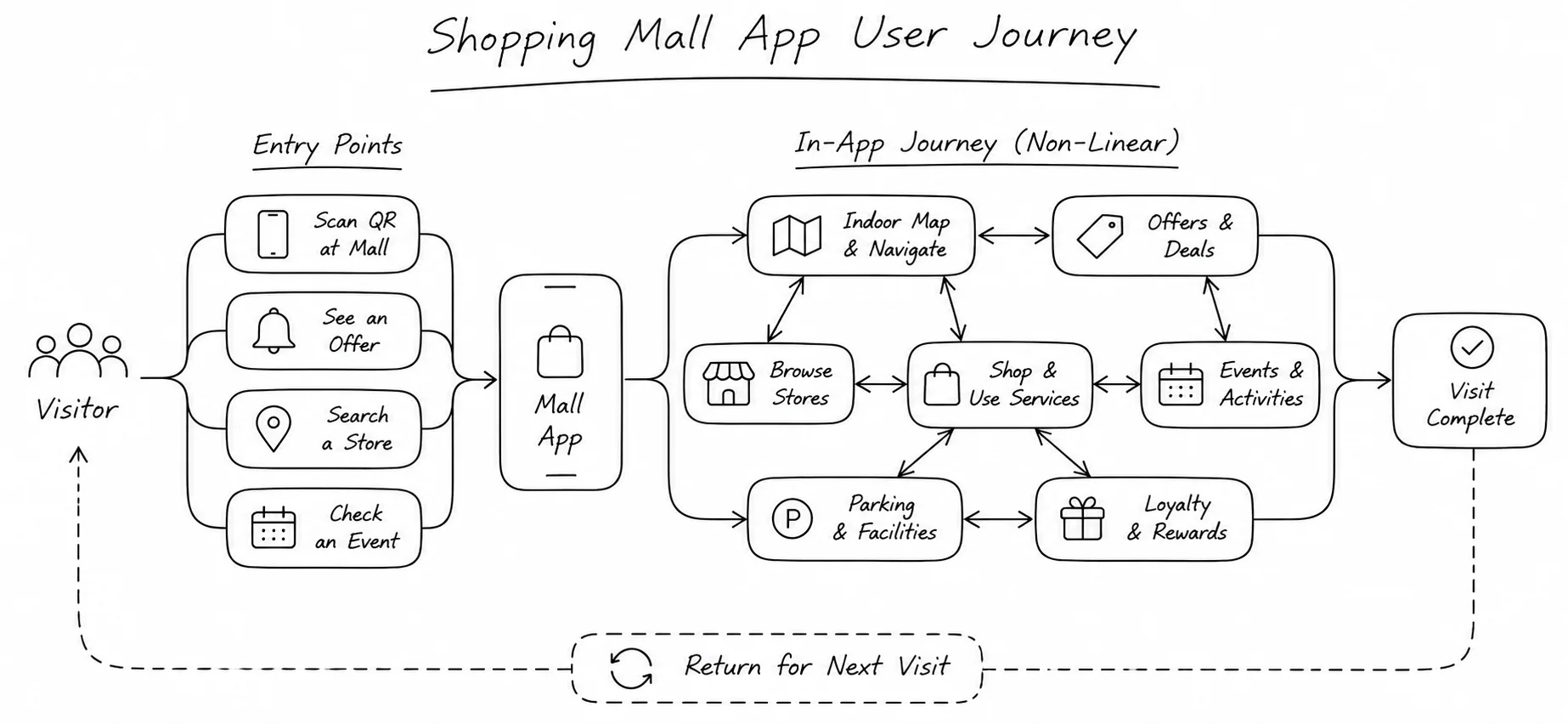
What this means for mall app design
A mall app should prioritise:
- Large, easy-to-tap controls.
- Clear typography and readable contrast.
- Short instructions rather than lengthy explanations.
- Simple maps with visible destinations.
- Clear floor information.
- Recognisable landmarks and directional cues.
- Minimal steps between search and navigation.
- Audio or haptic guidance where appropriate and supported.
For example, a direction such as "Continue towards the central atrium, then take the escalator to Level 2" can be easier to understand than a complicated map with a small highlighted route.
The app should also preserve the visitor's last search or destination if they switch screens, receive a call or temporarily leave the app. They should not have to start the task again.
The objective is not to keep visitors looking at their phones. It is to help them use the phone less while moving through the mall.
3. Speed, Connectivity and Reliability Are Core Features
A shopping mall app can have excellent features and an attractive interface, but visitors will struggle to use it if the experience is slow or unreliable.
Consider a typical situation:
A visitor opens the app to find a store. The homepage takes several seconds to load. They open the directory, but the search results are delayed. They select a store, and the map takes additional time to appear.
By this point, the visitor may have already decided to ask a security guard or mall employee for directions.
This is why performance should be treated as part of the product experience, not simply a technical consideration.
Build for inconsistent connectivity
Connectivity inside a large shopping mall can vary across floors, enclosed spaces, lifts and other areas. Visitors may also move between mobile data and mall Wi-Fi.
The app should not depend on a perfect internet connection for every basic task.
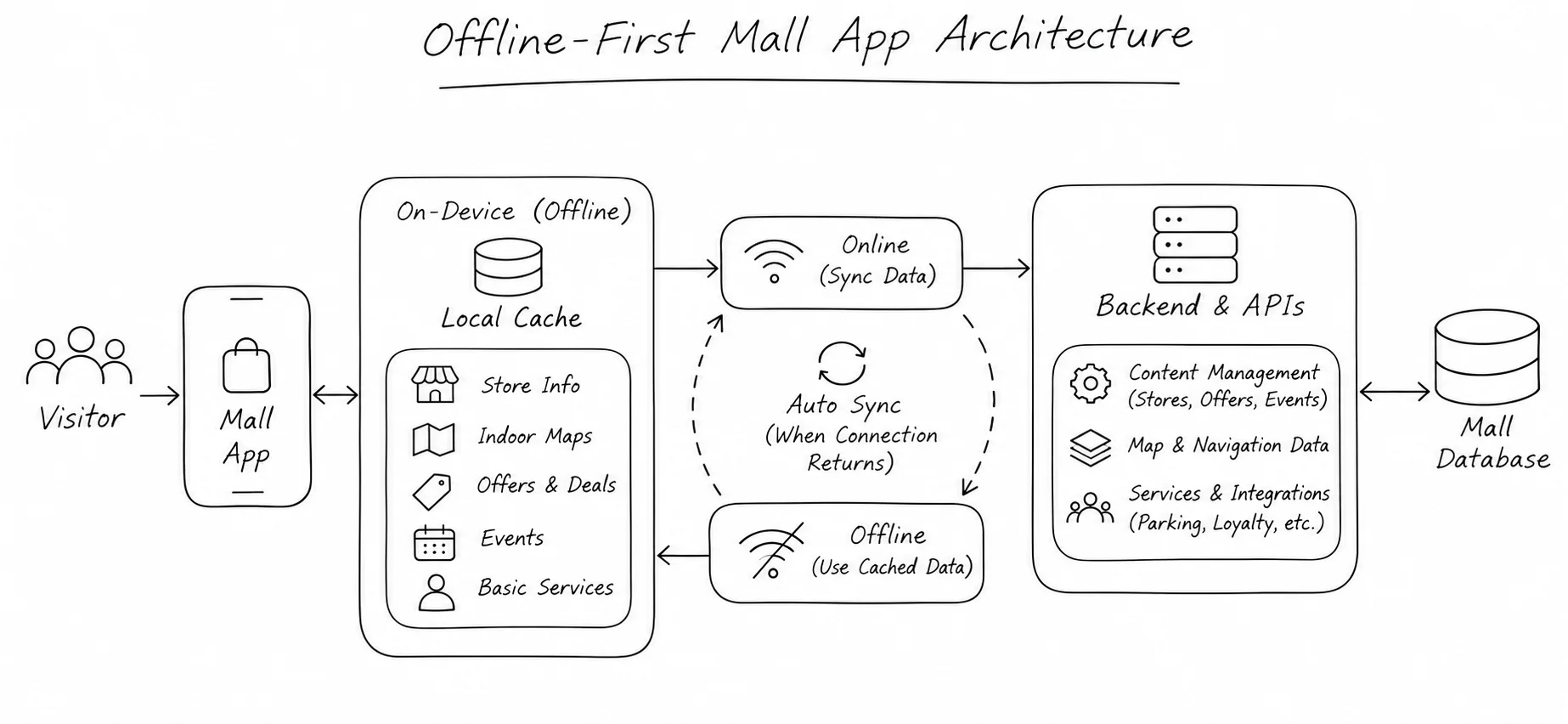
An offline-first approach can help. Android's architecture guidance recommends presenting locally available data immediately and keeping critical functionality usable when network access is unreliable. It specifically identifies temporary connection interruptions, including those experienced in elevators and tunnels. Source
For a mall app, this could mean caching:
- Store directories and categories.
- Store locations and floor information.
- Basic mall floor plans.
- Frequently accessed visitor information.
- Selected map and route data.
- Relevant promotional information, including validity details.
Live services such as current offers, real-time parking availability and live positioning may still require a network connection. The important distinction is that the entire app should not become unusable just because one service cannot connect.
Measure performance at the task level
It is not enough to measure how quickly the homepage loads.
Development and testing teams should also measure:
- Time taken to display search results.
- Time taken to open a store profile.
- Time taken to load a floor map.
- Time taken to calculate a route.
- Whether a visitor can recover after a connection interruption.
- Whether the app retains the visitor's destination after switching screens.
A reliable app should feel responsive throughout the journey, not just when it first opens.
4. Creating an Intuitive, Task-First Mall App
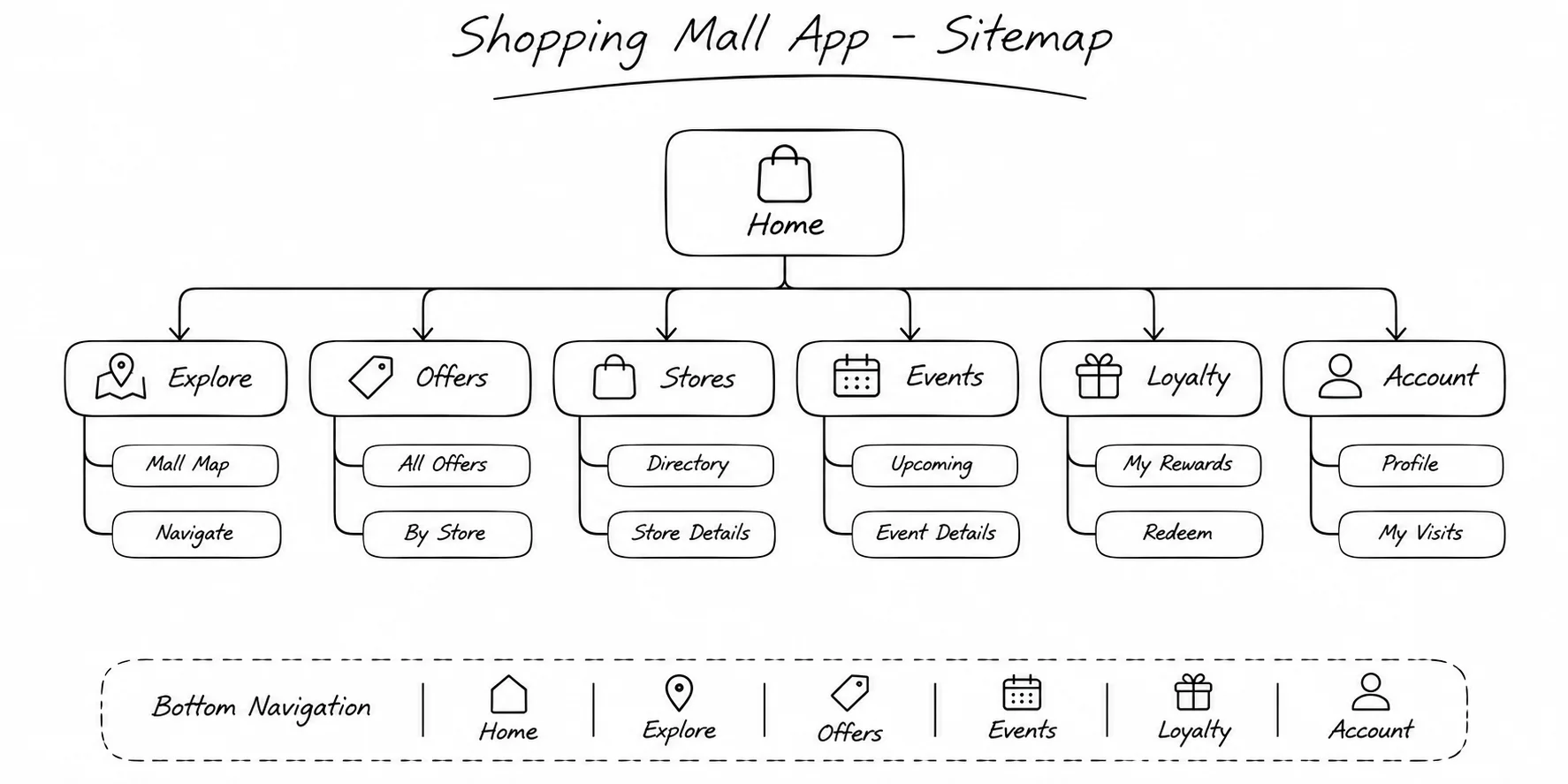
The homepage is often the visitor's first interaction with the app. Its structure should reflect the tasks visitors are most likely to perform.
A practical homepage hierarchy could include:
- Search: Find stores, brands, restaurants and services.
- Mall map: Explore floors, entrances and destinations.
- Parking: Find parking information and locate a parked vehicle where supported.
- Visitor services: Access restrooms, prayer rooms, information desks, accessibility services and other facilities.
- Offers: Explore current promotions and campaigns.
- Events and experiences: Discover activities, launches and seasonal events.
- AI assistance: Ask questions or get help finding information.
The order should be validated through actual visitor research and app usage data. It should not be determined solely by which department wants its content to receive the most visibility.
Search should be a primary feature
Visitors should be able to search by:
- Store or brand name.
- Product or service category.
- Restaurant or cuisine type.
- Mall facility.
- Event or attraction.
Search results should show useful information immediately, such as the store name, category, floor and location.
Where relevant, the result should provide a direct action to view the store on the map or start navigation.
Make the app easy to recover from interruptions
Visitors may switch between the app, their camera, messaging applications or phone calls.
The app should preserve relevant context, including:
- The last searched store.
- The selected destination.
- The current floor.
- The navigation route.
- The page the visitor was viewing.
This reduces frustration and avoids forcing users to repeat actions.
5. Indoor Mapping and Navigation: Connecting the Digital and Physical Mall
Indoor mapping is one of the most valuable capabilities a shopping mall app can offer.
Unlike outdoor navigation, GPS does not provide reliable positioning throughout enclosed shopping centres. Mall interiors also introduce additional complexity: multiple floors, corridors, atriums, entrances, escalators, lifts, bridges and interconnected buildings.
A proper indoor mapping solution involves much more than displaying a floor plan on a mobile screen.
It requires accurate spatial data, a digital map structure, store information, positioning technology and a navigation engine.
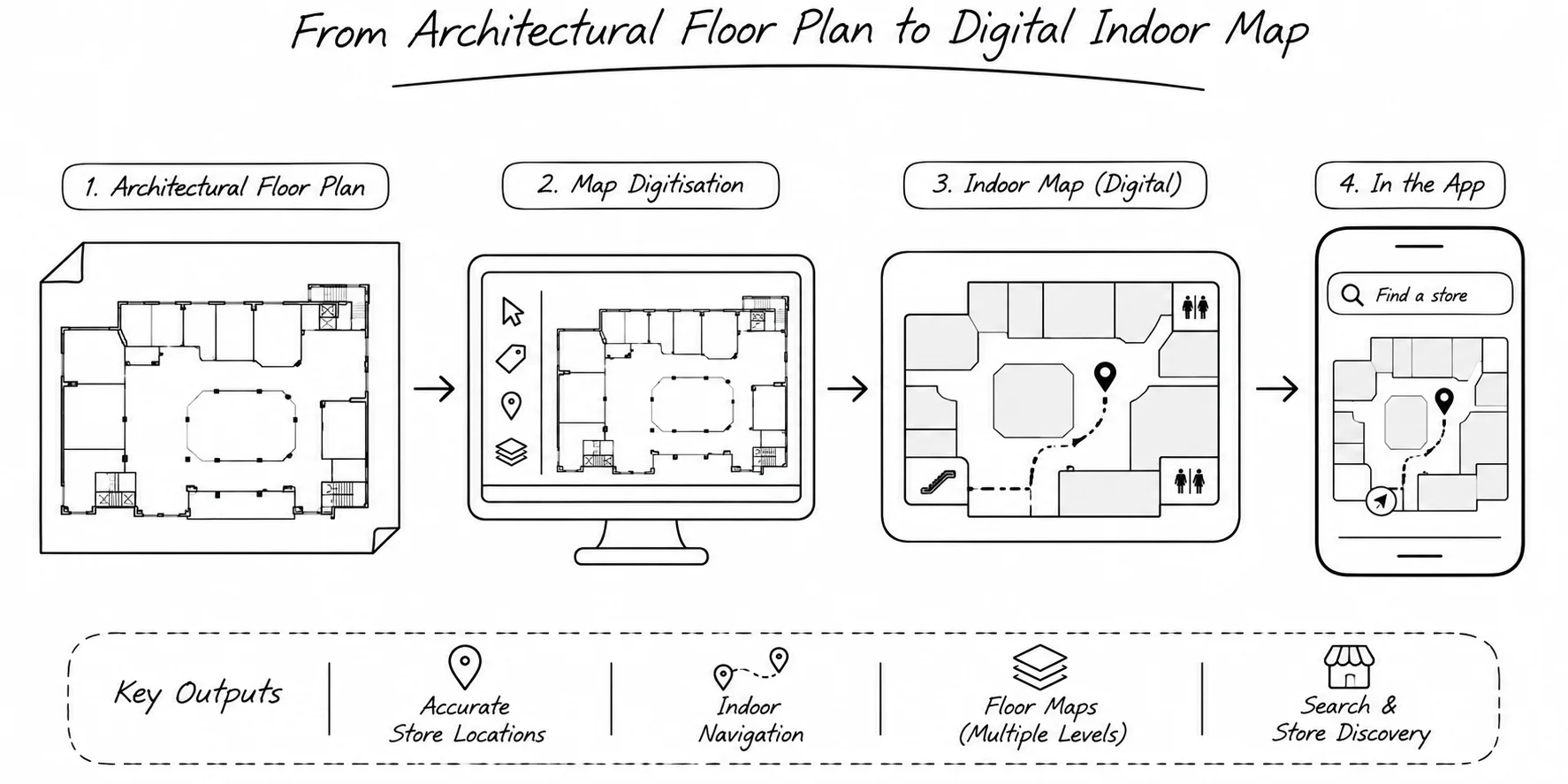
Step 1: Obtain and prepare the mall's floor plans
The starting point is usually the mall's architectural drawings, which may be available in CAD, BIM or other digital formats.
These plans need to be reviewed and prepared for use in the mapping system.
The process typically includes:
- Identifying all floors and building sections.
- Mapping corridors, walkways and public areas.
- Identifying entrances and exits.
- Marking escalators, lifts and staircases.
- Identifying facilities and key landmarks.
- Mapping individual store units.
- Establishing connections between floors.
Architectural drawings are not automatically ready for mobile navigation. They may contain construction details, measurements and technical information that visitors do not need.
The information must be converted into a clean, simplified digital map.
Step 2: Create a structured digital map
The digital map should represent the mall as a navigable environment.
Each floor can be represented as a separate map layer, with defined locations and connections.
Important elements include:
- Store boundaries and identifiers.
- Corridors and walkable areas.
- Entrances and exits.
- Vertical connections such as lifts and escalators.
- Public facilities.
- Landmarks and points of interest.
- Restricted or staff-only areas.
Store information should be connected to the map through unique identifiers. This allows the system to locate a store when a visitor searches for its name.
The map should also be maintainable. Mall layouts change when stores open, close, relocate or undergo renovation. A map that is accurate at launch can become unreliable if these changes are not reflected.
Step 3: Implement indoor positioning
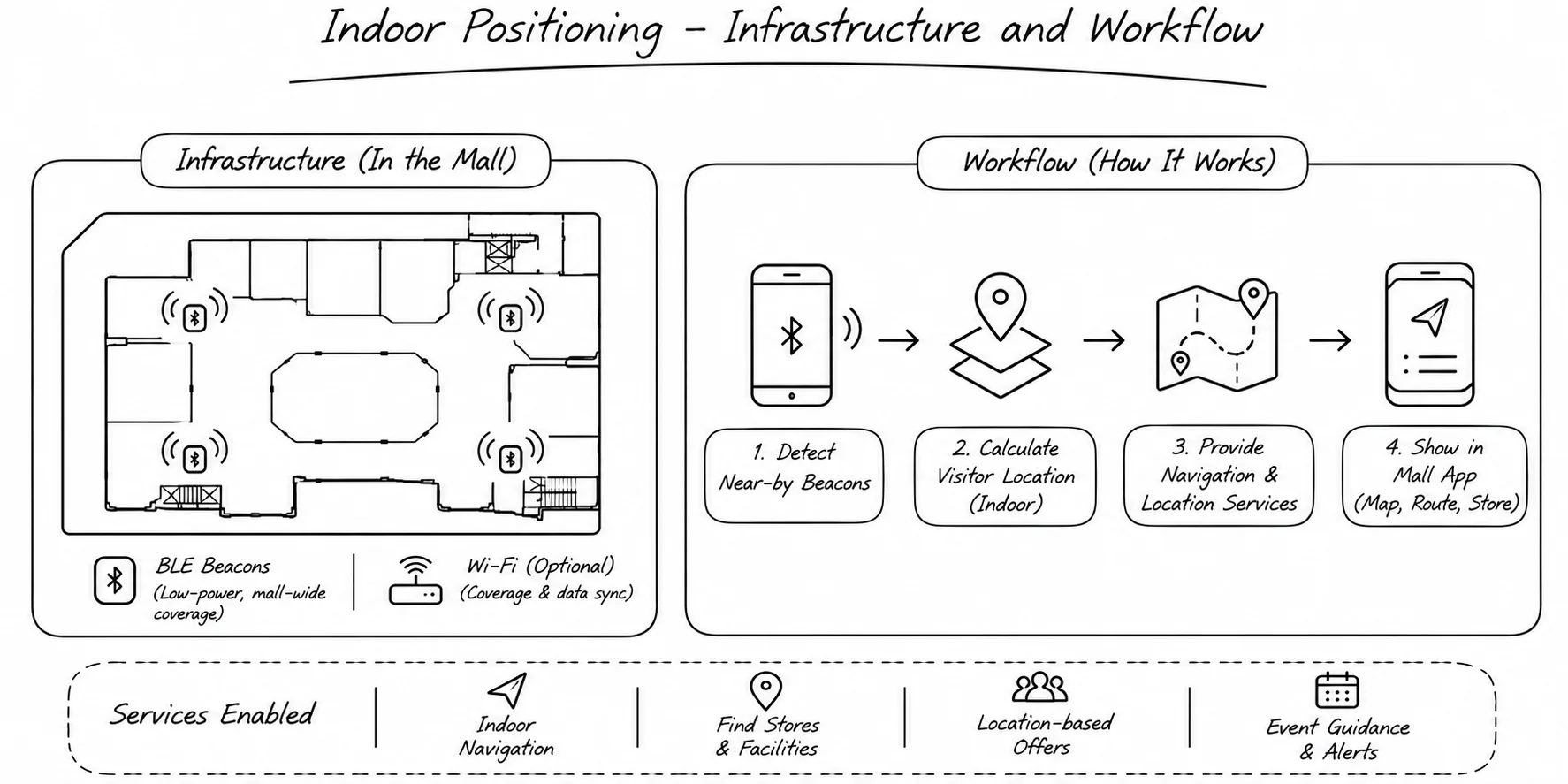
An indoor map tells visitors where places are. Indoor positioning estimates where the visitor is currently located.
There are several technologies that can support this.
Bluetooth Low Energy (BLE) beacons
BLE beacons are small wireless devices installed at selected locations throughout the mall. They broadcast signals that compatible mobile devices can detect.
The app can use signals from multiple beacons to estimate the visitor's location. The quality of the result depends on beacon placement, signal conditions, device behaviour and the positioning algorithm.
Wi-Fi positioning
Existing Wi-Fi infrastructure can sometimes be used to estimate a device's indoor location by analysing nearby access points and signal characteristics.
The accuracy depends on the infrastructure, calibration and environment.
Ultra-Wideband (UWB)
UWB can provide more precise ranging in environments where compatible devices and infrastructure are available. However, it requires suitable hardware and should be evaluated against deployment cost and device compatibility.
Visual positioning and camera-based approaches
Some solutions use cameras and visual references to help determine a visitor's position. These approaches can be useful in selected environments but introduce additional implementation, device and privacy considerations.
Hybrid positioning
A practical solution may combine multiple technologies rather than depending on one positioning method. The choice depends on the mall's architecture, existing infrastructure, accuracy requirements, maintenance capacity and budget.
It is important to distinguish between displaying an indoor map and providing live indoor positioning. A mall can offer a useful digital map without live positioning, while real-time navigation requires an additional positioning capability.
Step 4: Build the navigation and routing engine
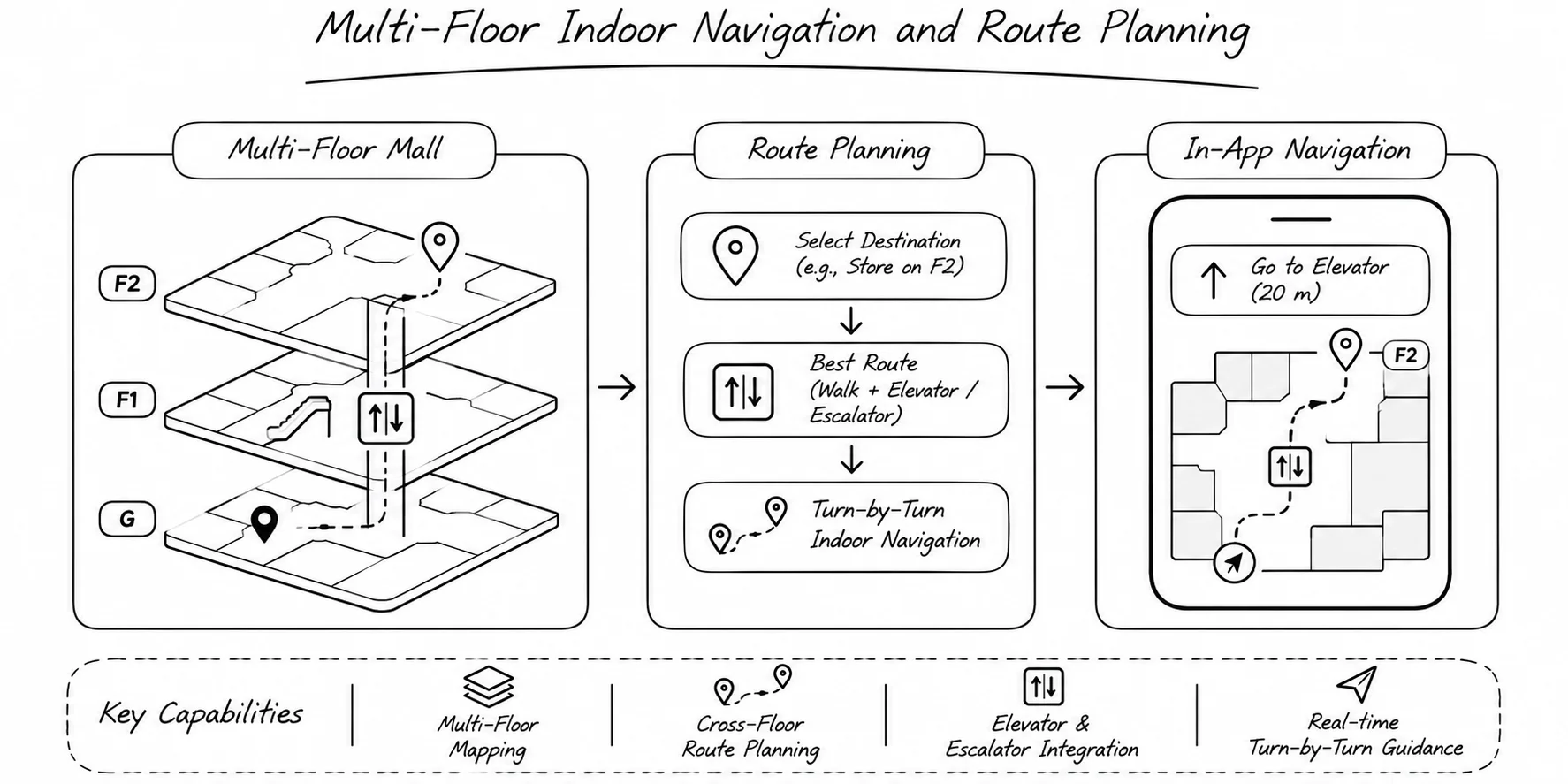
Once the map and positioning system are available, the next step is to calculate routes between locations.
A visitor should be able to search for a store and receive directions from their current position or a selected starting point.
The routing engine needs to understand:
- Walkable paths.
- Floor changes.
- Escalators, lifts and stairs.
- Restricted areas.
- Accessible routes.
- Entrances and exits.
- Connections between different mall sections.
The shortest route is not always the best route.
A 2022 study on indoor navigation requirements in shopping malls, based on 498 valid questionnaires, found that 78.51% of respondents wanted system guidance to specific shops. It also reported that 47.19% were dissatisfied with existing indoor navigation or signage. The study highlighted the importance of considering visitor preferences and changing environmental conditions rather than relying only on shortest-distance routing. Source
For example, a visitor using a wheelchair may need an accessible route. Another visitor may prefer an escalator instead of a lift. A route may also need to avoid a temporarily closed corridor.
The navigation system should therefore support more than a simple line between two points.
Step 5: Connect the map with the store directory and mall content
Indoor mapping becomes significantly more useful when it is integrated with the mall's content management system and store directory.
For example, when a visitor searches for a brand, the app should be able to retrieve:
- Store name and description.
- Store category.
- Floor and unit number.
- Opening hours.
- Contact details, where available.
- Current promotions.
- Map location.
- Navigation options.
The same map can support events, restaurants, facilities, exhibitions and temporary attractions.
Step 6: Plan for map maintenance
Indoor mapping is not a one-time implementation.
Mall operators need a process to update store locations, floor plans, facilities and route information.
A content management interface can allow authorised teams to update relevant information without requiring a new app release for every change.
Changes should be reviewed and validated before they appear to visitors, especially when they affect navigation.
A successful indoor mapping system is not simply a map that looks good. It is a maintained digital representation of the mall that helps visitors find places and move through the building with confidence.
6. Essential Features of a Shopping Mall App
The right feature set depends on the mall's size, positioning, visitor demographics, business model and operational requirements. However, several capabilities form a strong foundation.
Store and brand directory
A searchable directory should allow visitors to discover stores by name, category and other relevant filters.
Each listing can include store details, floor information, contact details, opening hours and a map location.
Offers and promotions
Visitors should be able to discover current offers from participating retailers.
Promotions can be organised by category, brand, campaign or validity period. Where supported, they can also be connected to store profiles and map locations.
Events and experiences
The app can promote seasonal celebrations, exhibitions, product launches, entertainment, workshops and other mall activities.
Visitors should be able to find event details, timings, locations and registration information where applicable.
Parking assistance
Parking is an important part of the mall visit.
Depending on available infrastructure, the app can offer parking zone information, vehicle location assistance, parking availability, digital payments or other parking services.
Features such as remembering a parking location may work without specialised hardware, while real-time parking availability requires suitable sensors or parking system integrations.
Loyalty and rewards
A mall loyalty programme can encourage repeat visits by connecting shoppers with rewards, points, member benefits and participating retailers.
The programme should make earning and redeeming rewards straightforward. It should also integrate with the operator's existing loyalty platform where one is available.
Visitor services
Important services should be easy to locate, including:
- Restrooms and accessible facilities.
- Prayer rooms.
- Information desks.
- Customer service.
- Baby care facilities.
- Medical assistance.
- ATMs and other essential services.
Notifications
Push notifications can communicate relevant offers, events, reminders and service updates.
However, notifications should be based on visitor preferences, relevance and consent. Sending too many promotional messages can make people disable notifications or stop using the app.
7. How a Mall App Benefits Retailers and Brands
A mall app should not be designed only for shoppers and mall management. Retailers and brands are important participants in the mall ecosystem.
For retailers, the app can become an additional channel for store discovery, promotion and customer engagement.
Improve store visibility
A searchable directory gives retailers another way to be discovered.
A visitor may not have a particular brand in mind but may be browsing a category such as fashion, electronics, beauty or restaurants.
Well-organised store listings help shoppers discover retailers they might otherwise walk past.
Promote offers and campaigns
Retailers can use the mall app to highlight selected promotions, seasonal campaigns, product launches and special events.
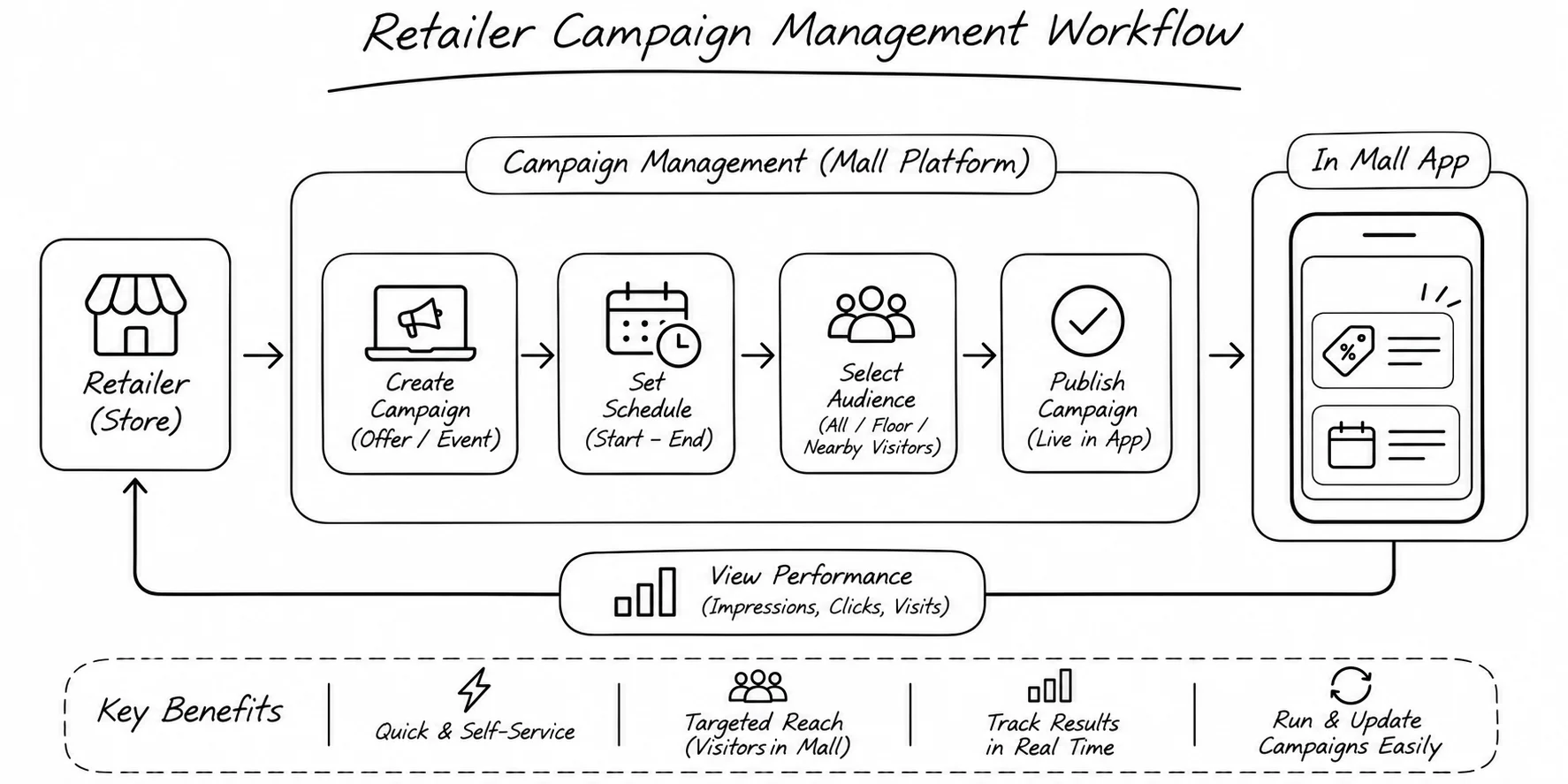
Depending on the mall's operating model, retailers may be able to submit campaign information through a dedicated portal for review and approval by the mall management team.
This gives the mall control over the quality and accuracy of published content while creating a more structured promotion process.
Connect digital discovery with physical visits
A visitor who discovers an offer in the app should be able to find the relevant store easily.
Connecting promotions to store profiles and indoor navigation creates a practical journey:
- Discover a brand or offer.
- View the store details.
- Locate the store on the mall map.
- Navigate to the store.
- Visit and engage with the retailer.
Support retailer events and launches
The app can help retailers promote in-store activities, product launches, workshops and exclusive events.
These capabilities can make the mall app more relevant to the commercial activities taking place inside the building.
Provide useful campaign insights
Where the app's analytics and privacy framework support it, mall operators can provide participating retailers with campaign-level insights.
Possible measurements include offer views, clicks, campaign engagement and interactions with store listings.
These metrics should be presented carefully. An offer view or map interaction does not automatically mean that a visitor entered the store or made a purchase.
Consider a retailer portal
For larger malls, a retailer-facing portal can make content management more efficient.
Depending on the requirements, retailers may be able to:
- Update store information.
- Submit offers and promotions.
- Upload campaign creatives.
- Submit event information.
- Review campaign performance.
- Manage authorised users.
Mall management should retain approval controls, publishing permissions and content governance.
Not every mall needs a full retailer portal at launch. It can be introduced when the number of tenants, campaigns and content updates justifies it.
8. How AI Is Changing Shopping Mall Apps
Artificial intelligence is creating new possibilities for shopping mall apps. The opportunity is not simply to add a chatbot, but to make information discovery, personalisation and mall operations more intelligent.
Some capabilities can be implemented using current AI services and integrations. Others depend on infrastructure, data quality and more advanced deployments.
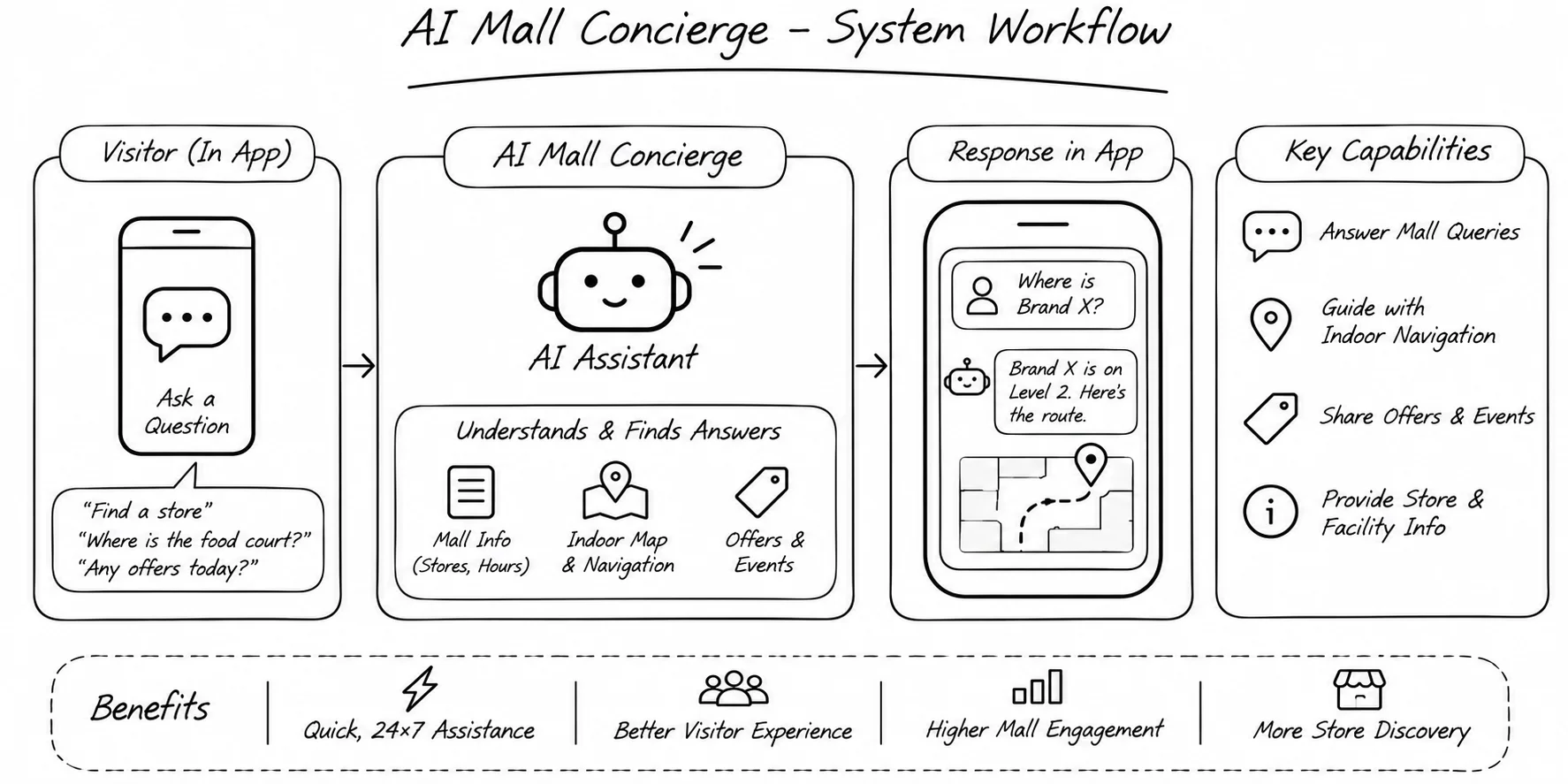
AI-powered mall concierge
A conversational assistant can help visitors find information using natural language.
Instead of navigating through several menus, a visitor could ask:
- Where can I find sports shoes?
- Which restaurants are on Level 2?
- Where is the nearest restroom?
- Are there any offers on electronics?
- How do I get to the cinema?
The assistant can retrieve answers from the mall's store directory, map, events, facilities and promotions.
For this to work reliably, the AI needs access to accurate, maintained mall information. It should also recognise when it does not have enough information and direct visitors to an appropriate support channel.
Personalised recommendations
With appropriate consent and data governance, AI can help recommend relevant stores, offers and experiences.
Recommendations might consider a visitor's selected interests, previous interactions, current campaign preferences or other permitted signals.
For example, someone interested in dining could receive relevant restaurant suggestions, while a visitor exploring children's activities could discover family-oriented events.
Personalisation should remain useful rather than intrusive. Visitors should have meaningful control over preferences and notifications.
Visual and conversational search
AI-powered visual search can allow visitors to use images to explore related products or store categories.
For example, a visitor might upload a picture of a product they are looking for and receive relevant store suggestions, provided the mall has suitable product or retailer data.
Conversational search can also understand more natural requests than traditional keyword search.
These capabilities depend on the availability and quality of product catalogues and retailer information. They should not be presented as guaranteed features when the underlying data does not exist.
AI-assisted indoor navigation
AI can potentially improve navigation by helping interpret visitor requests, recommending suitable routes and supporting more natural destination discovery.
For example, a visitor could ask for the easiest route to a restaurant from a particular entrance.
However, AI does not replace the underlying indoor map, positioning system or routing engine. Those components still need accurate spatial data and reliable infrastructure.
Predictive analytics for mall operators
Mall operators can use analytics and, where appropriate, machine learning to identify patterns in visitor activity and campaign performance.
Potential applications include:
- Understanding broad visitor movement patterns.
- Identifying popular areas and facilities.
- Analysing campaign engagement.
- Forecasting demand for selected services.
- Supporting operational planning.
Computer vision and other sensor-based systems may also help estimate footfall or movement patterns, but these require careful consideration of privacy, transparency, consent and applicable regulations.
AI tools for retailers
AI can also support the retailer side of the ecosystem.
Possible capabilities include generating promotional copy, assisting with campaign submissions, categorising offers and summarising campaign performance.
These tools can reduce repetitive work, but published content should still be reviewed for accuracy and compliance with mall guidelines.
The most useful AI features are those that solve a real visitor or operational problem. AI should strengthen the mall app's existing services, not become an extra layer of complexity.
9. Building One App for Multiple Mall Destinations
Mall operators managing several shopping centres may need a different approach from an operator developing an app for a single destination.
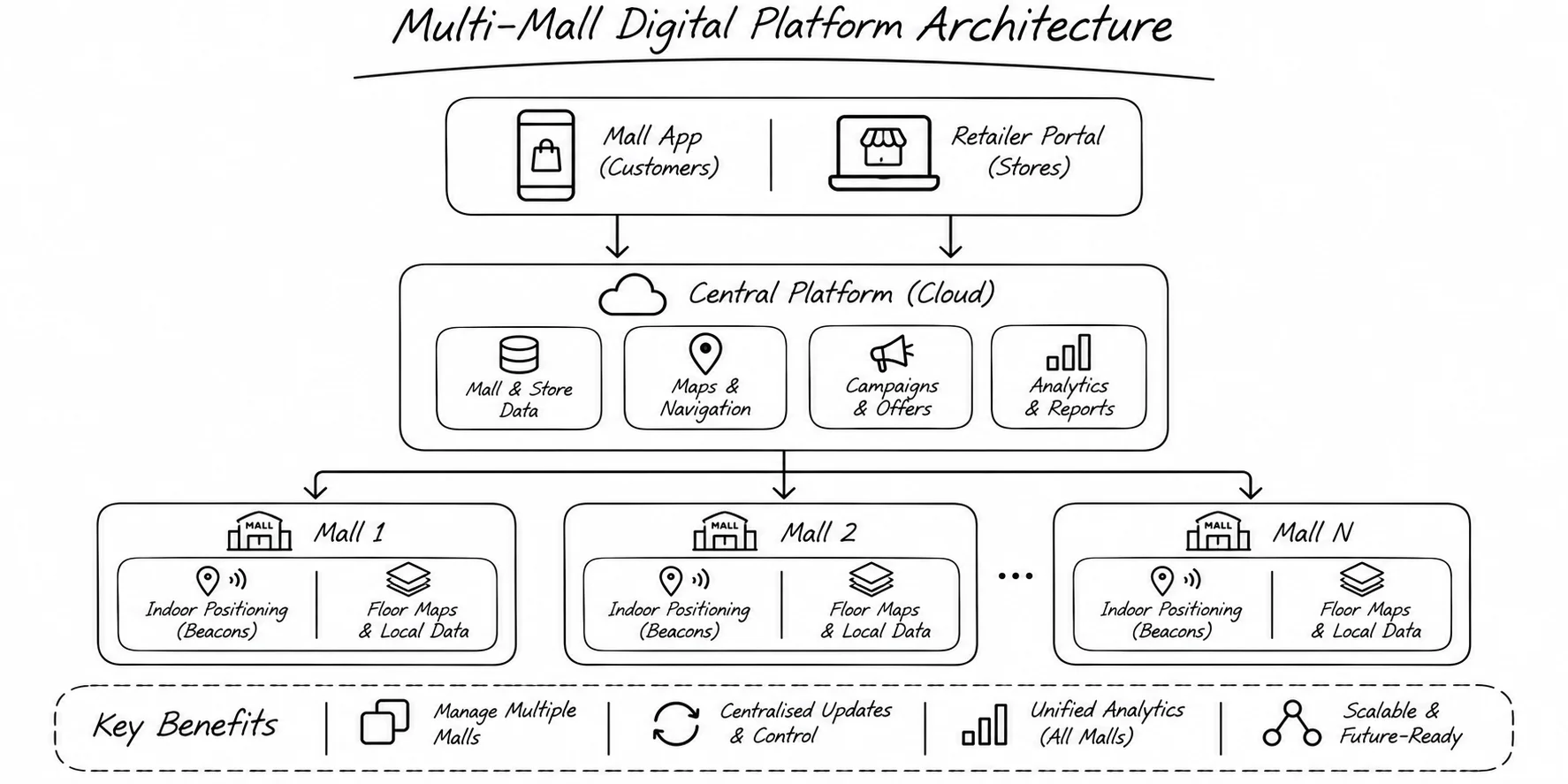
A multi-mall platform can provide a consistent digital experience across several properties while allowing each mall to maintain its own identity and content.
For example, a group operating multiple shopping centres may want:
- A shared app structure and design system.
- Individual mall profiles and branding.
- Separate store directories and maps.
- Mall-specific offers and events.
- Shared loyalty or membership services.
- Centralised content and campaign management.
- Property-level reporting and analytics.
The architecture should distinguish between shared platform capabilities and mall-specific information.
A common platform can reduce duplicated development and simplify maintenance. However, it should not force every mall into an identical experience when their layouts, audiences, facilities and commercial strategies differ.
This is particularly important when supporting multiple properties across different cities or countries, where language, payment methods, operational processes and local integrations may vary.
10. Technology and Integrations Behind a Mall App
A shopping mall app is usually part of a wider digital ecosystem. Its value depends on how well it connects with the systems that already support mall operations.
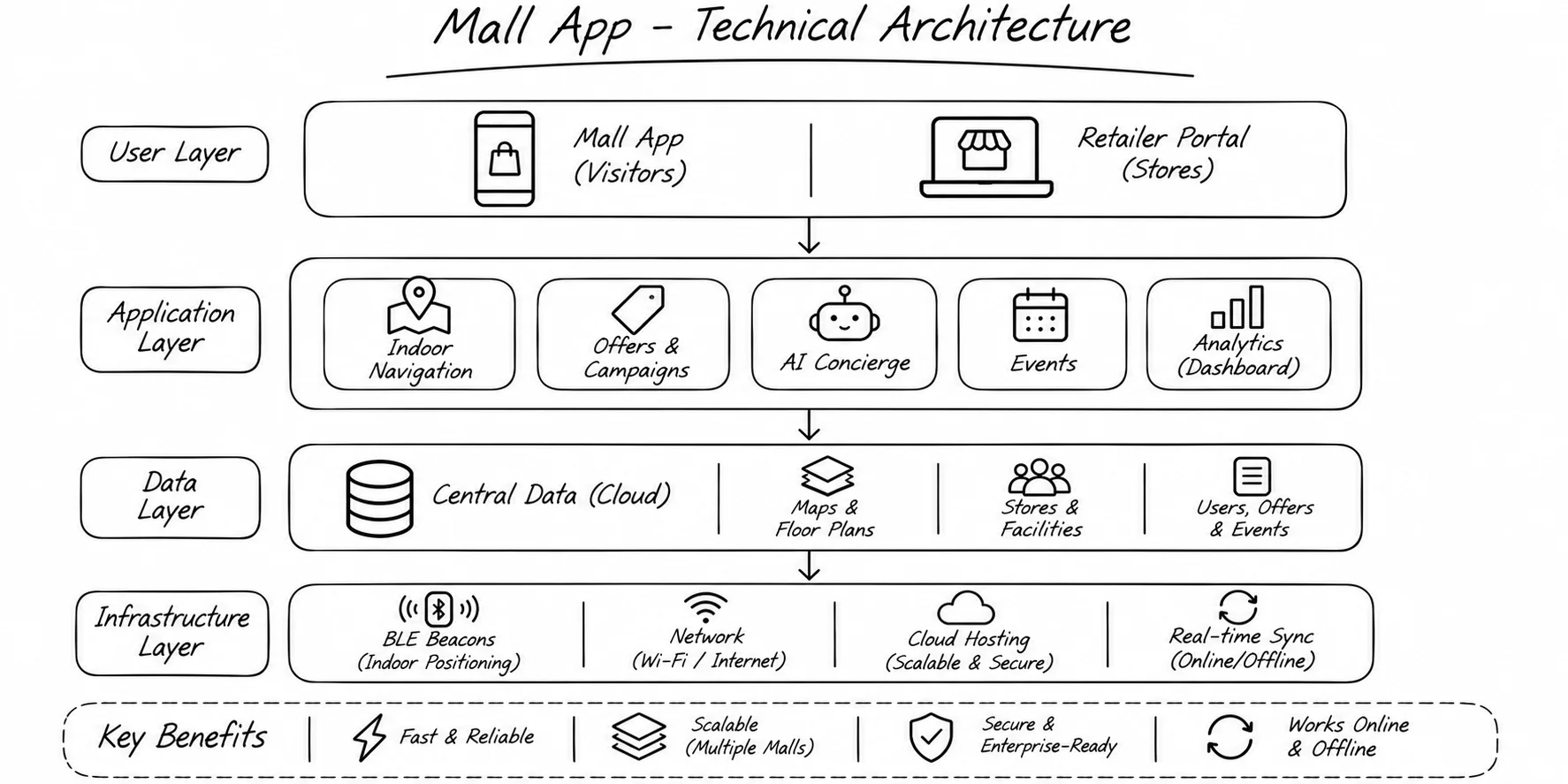
The technology architecture will vary depending on the project's scope, but common components include:
Mobile application
The iOS and Android applications provide the visitor-facing experience.
The technology choice should consider performance, device compatibility, accessibility, maintainability and the need to support different mall services.
Backend and APIs
The backend manages application data, business logic, user accounts, content and integrations.
APIs allow the mobile app to retrieve information from the mall's systems and connected services.
Content management system
A CMS allows authorised teams to manage store listings, offers, events, facilities, banners and other content.
For multi-mall platforms, it should support permissions at group, property and department levels.
Indoor mapping and positioning services
These services manage floor plans, map data, positioning information and navigation.
They may connect to external mapping platforms, positioning infrastructure or custom-built systems depending on the project requirements.
Third-party integrations
Potential integrations include:
- Parking management systems.
- Loyalty and rewards platforms.
- Payment gateways.
- CRM and marketing automation systems.
- Retailer and tenant management systems.
- Event management platforms.
- Analytics and reporting tools.
- Customer support systems.
- AI services.
Not every integration is necessary for every mall. The architecture should be based on business priorities and existing infrastructure rather than adding technology for its own sake.
Security, privacy and governance
Mall apps may process personal information, location data, account details and behavioural interactions.
The solution should include appropriate access controls, secure data handling, consent management, retention policies and compliance with applicable privacy regulations.
Location-based personalisation and AI-driven services should be transparent about what information is collected and how it is used.
11. Planning, Measuring and Improving the Mall App
A mall app should not be treated as a project that ends when the app is published.
It needs ongoing product management, content maintenance, technical monitoring and improvement based on visitor and retailer needs.
Start with visitor and stakeholder research
Before development, understand the needs of the people who will use and manage the app.
This should include:
- First-time and frequent visitors.
- Families and visitors with children.
- Older visitors.
- Visitors with accessibility requirements.
- Retailers and brand representatives.
- Mall operations and marketing teams.
- Customer service staff.
Observe how people find stores, use existing signage, discover offers and access visitor services.
Usability testing should also take place inside the actual mall environment. Testing only in an office or on a desktop prototype will not reveal all the challenges of using the app while walking through a busy building.
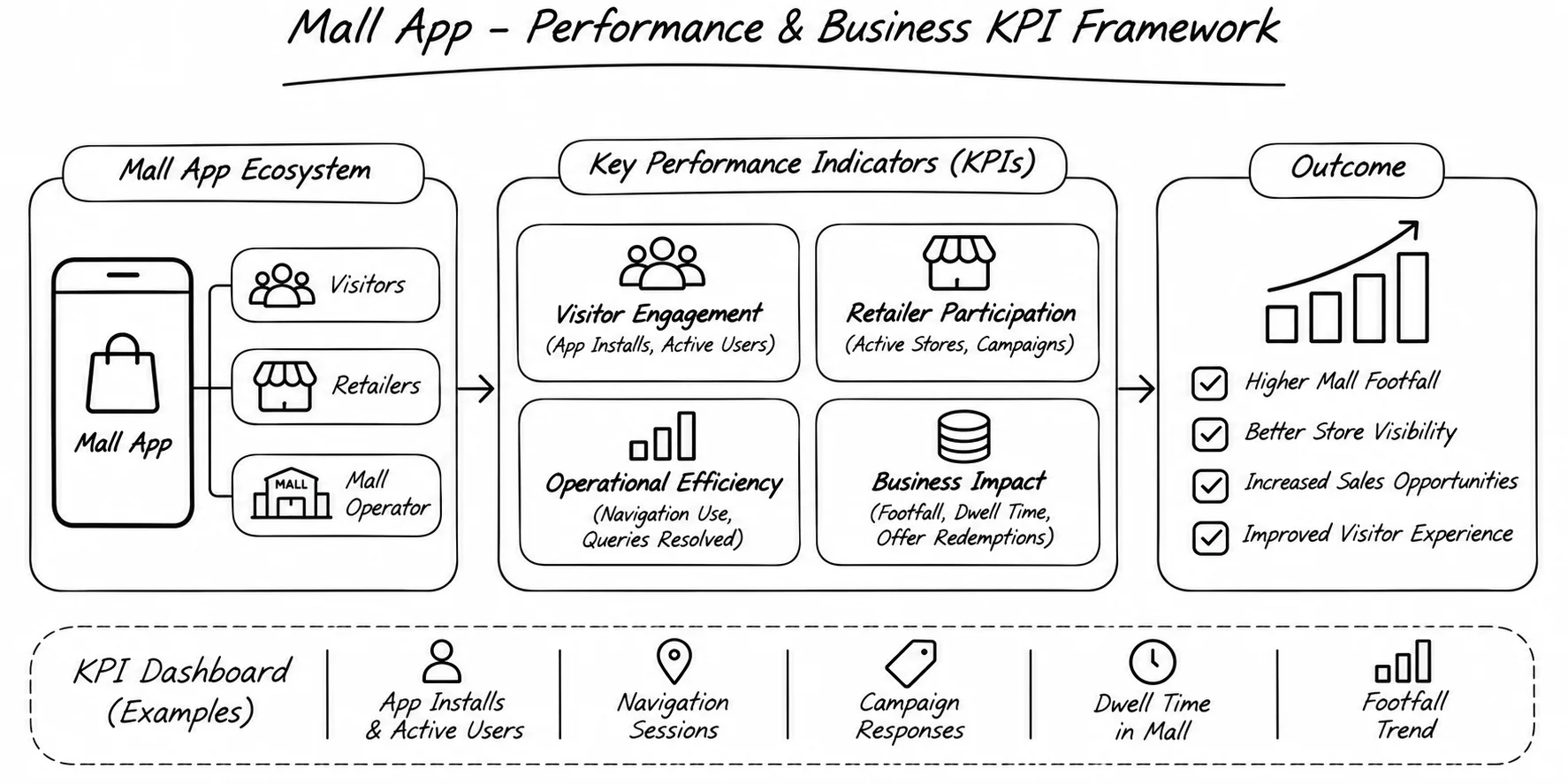
Define the right success metrics
Downloads alone do not show whether a mall app is useful.
The measurement framework should connect product activity with visitor and business outcomes.
Visitor engagement
- App registrations and active users.
- Repeat usage across visits.
- Store directory searches.
- Map and navigation usage.
- Offer and event engagement.
Task completion and usability
- Store search success rate.
- Time taken to find a destination.
- Navigation completion rate.
- Search abandonment.
- Requests for assistance during tested tasks.
- App crashes and performance issues.
Retailer engagement
- Retailer participation.
- Offers and campaigns submitted.
- Campaign views and interactions.
- Store profile engagement.
- Retailer portal usage, where available.
Operational performance
- Content update frequency.
- Store information accuracy.
- Map update turnaround time.
- System availability.
- Support requests and issue resolution.
Metrics should be interpreted in context. For example, increased map usage may indicate better adoption, but it may also indicate that visitors are struggling to find their way. Qualitative feedback and task-completion data help explain what the numbers mean.
Treat the app as an evolving digital product
Store tenants change, promotions expire, events are introduced, facilities are updated and visitor expectations evolve.
The app must evolve with the mall.
A structured improvement process should include regular usability reviews, analytics analysis, visitor feedback, retailer input, technical maintenance and planned feature releases.
The best approach is to establish a strong foundation first, then expand the product based on evidence.
Building a Better Digital Mall Experience
A shopping mall app should connect the digital experience with what happens inside the physical destination.
For visitors, that means finding stores, navigating the building, discovering offers and accessing services without unnecessary effort.
For retailers and brands, it means better visibility, promotional opportunities and a more direct connection with shoppers.
For mall operators, it means a digital platform that supports visitor engagement, tenant participation, operational services and measurable improvements.
The technology behind the experience matters, but the starting point should always be the people using it. Understanding visitor behaviour, designing for real-world conditions, building reliable indoor mapping and connecting the right systems are what turn a collection of app features into a useful digital product.
At Wolfpack, we work across digital strategy, product design, mobile app development and technology integrations to help businesses plan and build digital products around real operational and customer needs.
If you're planning a shopping mall app or looking to improve an existing one, the right starting point is understanding the experience you want to create for visitors, retailers and the wider mall ecosystem.
FAQs About Shopping Mall App Development
A strong foundation includes a searchable store directory, indoor map, navigation, offers, events, parking information and visitor services. Loyalty, retailer portals and AI-powered assistance can be added based on the mall's requirements.
Core Takeaway
The technology behind the experience matters, but the starting point should always be the people using it. Understanding visitor behaviour, designing for real-world conditions, building reliable indoor mapping and connecting the right systems are what turn a collection of app features into a useful digital product.
Dig Deeper


Written by
Shebin K
CEO at Wolfpack
Shebin is a builder at the intersection of product, technology, AI, and business operations, taking ideas from 0 to 1 and scaling them from 1 to N through strategic execution, digital transformation, and operational excellence.
Start a Brief
Want to engineer this into your product?
Let’s talk through your design system, architecture, or performance growth goals.